Organizing events or coordinating volunteers can be a complex task, especially when it involves managing multiple schedules, preferences, and tasks. Efficient signup and volunteer management tools can make all the difference, streamlining the process so organizers can focus on making the event a success. Among the many tools available, Signup Genius and Signup.com stand out as two of the most popular options, each offering unique features designed to simplify signup management. But with so many similarities—and a few key differences—how do you choose the one that best fits your needs? In this post, we’ll compare Signup Genius and Signup.com based on essential criteria like features, pricing, ease of use, and integrations, to help you make an informed choice for your next event.
Overview of Signup Genius and Signup.com
Signup Genius and Signup.com are both widely used tools in event and volunteer management, trusted by schools, nonprofits, businesses, and other organizations to streamline signup and coordination tasks. Here’s a closer look at each platform’s background, mission, and reach.
Signup Genius
Launched in 2008, Signup Genius was created with a mission to simplify volunteer and event management for groups of all sizes. Originally targeting schools and community organizations, Signup Genius quickly expanded its user base and today serves a diverse array of users, including businesses, churches, sports leagues, and families. The platform allows organizers to create custom signups for events, volunteer shifts, and tasks, making it easy for participants to view and claim slots.
With a user-friendly interface and various customization options, Signup Genius is known for its simplicity and adaptability. The platform now boasts over 120 million users worldwide, supporting events and volunteer efforts in dozens of countries.
Key Statistics for Signup Genius:
-
Founded: 2008
-
User Base: Over 120 million users
-
Countries Served: 180+ countries
-
Primary Users: Schools, nonprofits, businesses, sports organizations, churches
Signup.com
Signup.com was developed as an all-in-one solution for organizing people and events, especially suited for volunteer and nonprofit environments. Since its launch, the platform has focused on providing a flexible system that enables organizations to manage everything from small gatherings to large-scale volunteer efforts. Signup.com is commonly used by teachers, event organizers, community groups, and teams who need robust scheduling options and tools to communicate with participants.
Signup.com has a strong emphasis on reducing communication friction, offering features like automatic reminders and group messaging to help participants stay informed. The platform has a solid international presence with millions of users worldwide and continues to grow its reach in sectors like education, faith-based organizations, and local governments.
Key Statistics for Signup.com:
-
Founded: 2009
-
User Base: Over 20 million
-
Countries Served: Over 100 countries
-
Primary Users: Educators, community organizations, nonprofits, sports teams, local governments
Features Comparison
Signup Genius and Signup.com both offer a range of tools to simplify the creation, management, and coordination of event signups and volunteer schedules. Here’s how each platform stacks up in terms of features that streamline the signup process:
-
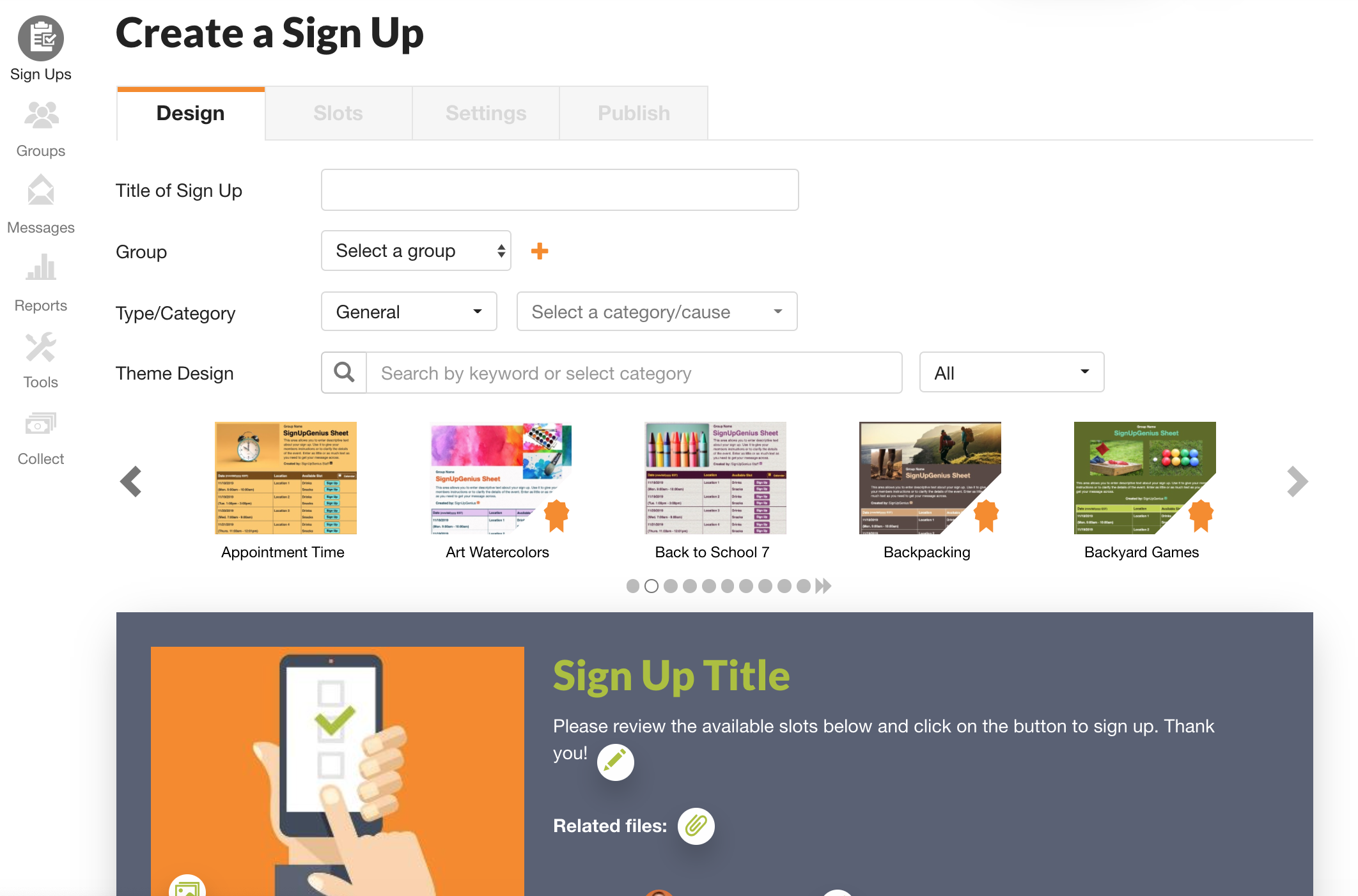
Signup Genius: Known for its straightforward approach, Signup Genius allows users to easily create, edit, and manage signups for events, volunteer shifts, and tasks. The platform provides a step-by-step wizard to guide organizers through the setup, making it accessible even for those who are less tech-savvy. Once created, events and signup pages are easy to share via email or social media. Scheduling options allow organizers to set repeating events, assign specific tasks, and manage participant slots, while participants can sign up with a few clicks, ensuring minimal friction. Signup Genius also offers automated reminders, reducing no-shows and improving overall coordination.
-
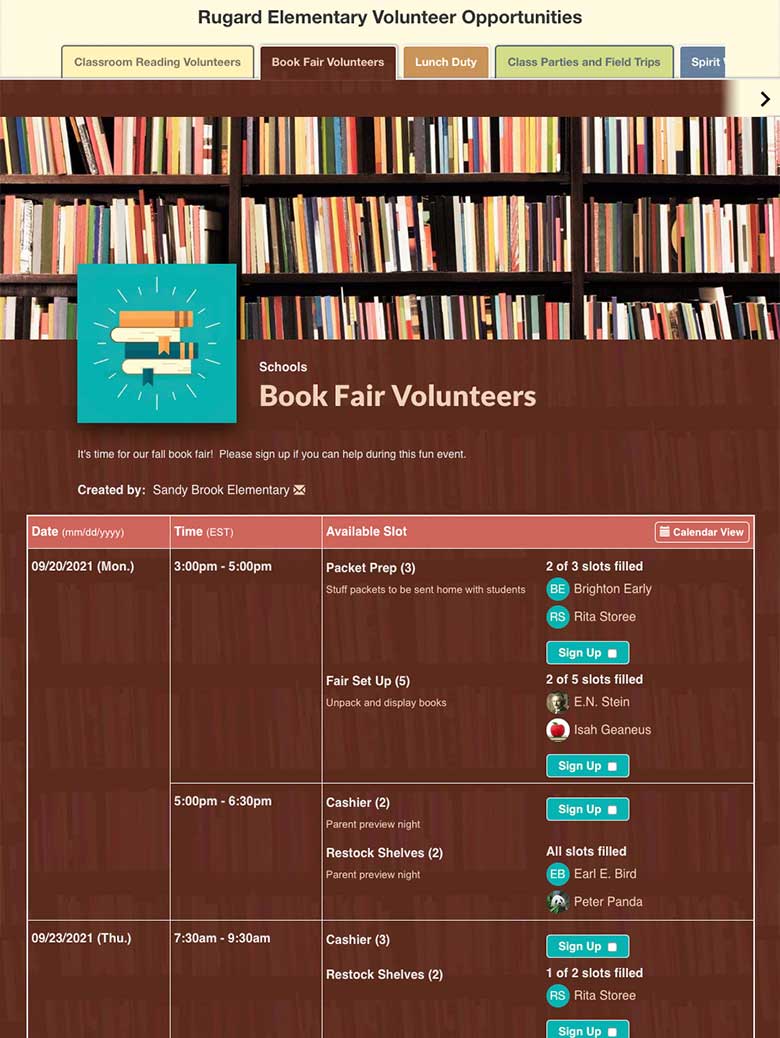
Signup.com: Signup.com provides a similar feature set but with a more comprehensive focus on task and volunteer management. This platform allows users to set up detailed signups with options for recurring events, custom time slots, and task assignments. With Signup.com, organizers can manage everything from single volunteer shifts to complex multi-day events, making it a flexible solution for both small and large events. The platform also includes tools for group messaging, automated reminders, and even participant reporting, allowing organizers to track engagement and attendance easily.
Customization and Branding
Both platforms provide various options to customize the look and feel of signup forms, emails, and event pages, although they differ in flexibility and branding capabilities:
-
Signup Genius: Offers several customization options, including themes and templates, so organizers can personalize the appearance of their signup forms. Higher-tier plans allow more branding options, such as adding logos and colors that match an organization’s brand. Additionally, Signup Genius offers customized confirmation emails and reminders, letting organizers reinforce their brand identity at each step of the signup process. For more advanced customization, however, users will need to subscribe to a premium plan.
-
Signup.com: While Signup.com also includes templates and themes, it’s known for providing more comprehensive branding options across all pricing tiers. Even on lower plans, organizers can add custom logos and color schemes to match their organization’s branding. Signup.com’s forms and communications are also more customizable in terms of layout and information fields, allowing organizers to tailor signups to specific event needs. The ability to add visual elements like logos and customize email templates enhances the professional appearance of Signup.com’s pages and communications, helping organizers maintain a cohesive brand presence.
User Experience (UX) and Accessibility
-
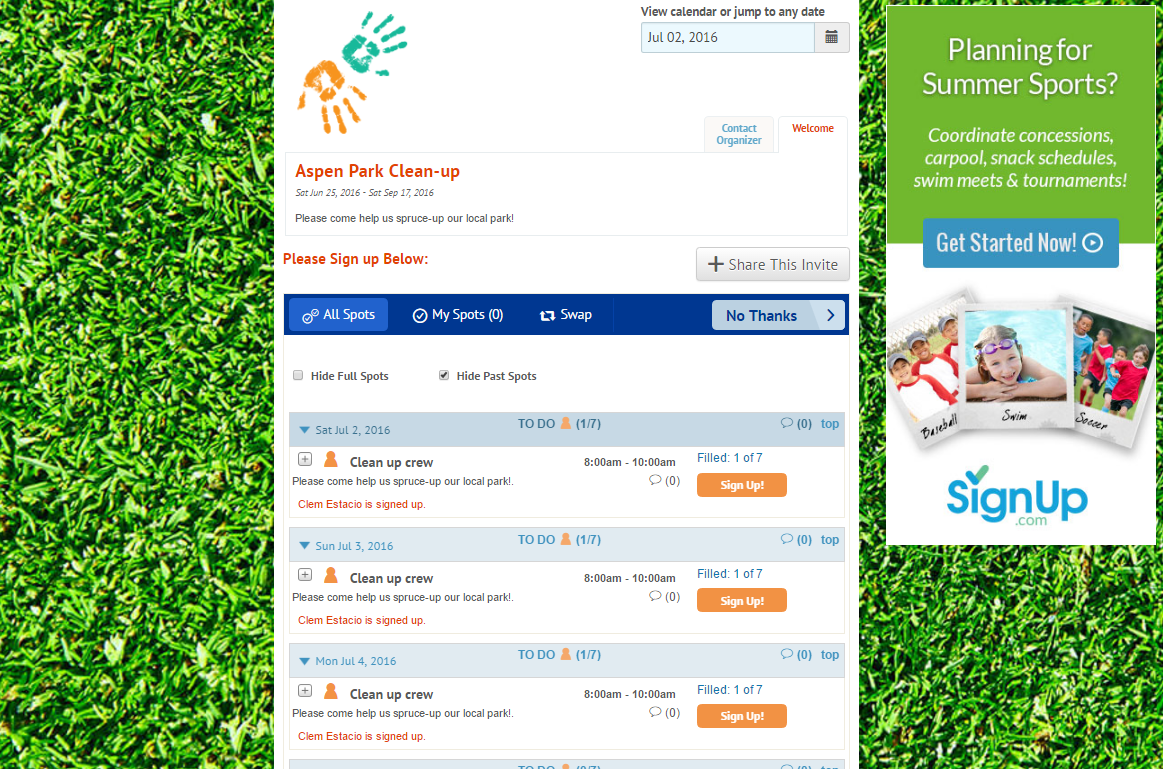
Signup Genius: Signup Genius’s User Experience (UX) and interface can feel outdated, particularly when compared to modern web applications. The design relies heavily on static layouts, minimal use of dynamic or responsive elements, and a dated aesthetic that lacks the sleek, streamlined appearance users now expect. The navigation, while functional, can feel clunky, with dropdown menus and links that sometimes require extra steps to accomplish tasks. Additionally, the limited customization options for sign-up forms make the platform less adaptable to diverse user needs. For organizations or individuals seeking an intuitive, polished platform, this can make Signup Genius feel less engaging and harder to use than its competitors.
-
Signup.com: Signup.com provides a similar focus on ease of use, offering a simple interface that’s intuitive for both novice and experienced users. The platform is mobile-friendly and includes a dedicated mobile app, which makes it easier for organizers to manage signups and for participants to respond on the go. Signup.com also emphasizes accessibility, with features that comply with accessibility standards, ensuring a more inclusive experience for all users, including those with disabilities. This makes Signup.com a strong choice for organizations that prioritize accessibility alongside mobile functionality.
Advertisements
When comparing SignUpGenius and SignUp.com, one key difference is how they incorporate advertisements into their free plans. SignUpGenius displays ads on its free version, which may disrupt the user experience for those signing up for events or volunteering, but it offers a clean, ad-free interface on its paid plans. SignUp.com, on the other hand, also includes ads on its free tier, but some users find its ads more visually intrusive. Both platforms allow you to remove ads by upgrading to a paid subscription, which also unlocks additional features like advanced customization, analytics, and branding options. If maintaining a professional and distraction-free experience is critical for your audience, the decision may hinge on your willingness to invest in a paid plan with either tool.
Integrations and Compatibility
When choosing an event and volunteer management platform, integrations can play a crucial role in simplifying workflows, especially for organizations that rely on multiple tools. Signup Genius and Signup.com each offer integrations that help enhance their core functionality, but they differ in scope and compatibility options.
Signup Genius
Signup Genius supports a variety of integrations that streamline event coordination and improve participant communication:
-
Google Calendar Integration: Signup Genius allows users to sync their events with Google Calendar, enabling organizers and participants to view signups alongside other calendar commitments. This feature is helpful for keeping both organizers and volunteers on schedule.
-
Email Marketing Platforms: For organizers who want to keep participants engaged, Signup Genius integrates with popular email marketing platforms like Mailchimp and Constant Contact. This allows users to seamlessly add participants to mailing lists for updates, event follow-ups, or future volunteer opportunities.
-
Social Media Sharing: Signup Genius also makes it easy to share signup links directly through social media, with built-in options for platforms like Facebook, Twitter, and LinkedIn. This is particularly useful for public events that benefit from broad visibility and social engagement.
-
Web Embedding: For organizations that want a more cohesive experience, Signup Genius offers embed codes that allow users to embed signups directly on their websites. This feature ensures a smoother user experience by allowing participants to sign up without navigating away from the host website.
Signup.com also provides several integration options, but with added flexibility and unique capabilities for organizations with higher customization needs:
-
Calendar Integrations: Similar to Signup Genius, Signup.com integrates with Google Calendar, iCalendar, and Outlook, allowing users to sync events and keep track of participant commitments in one place. The platform’s calendar sync feature supports recurring events and customized reminders, which is useful for organizers handling multi-day or repeating events.
-
Email Marketing and CRM Platforms: Signup.com offers integrations with platforms like Mailchimp and Salesforce, which allows users to manage participant lists and follow up with volunteers seamlessly. These integrations make it easier for organizers to track engagement and communicate more effectively with their audiences over time.
-
Social Media and Web Embedding: Signup.com also allows sharing via social media and provides embed codes for website integration, giving participants direct access to signups from any website. This feature is especially valuable for schools, churches, and nonprofits looking to simplify the signup experience for their communities.
-
API Access: One of Signup.com’s unique features is API access, available with its Enterprise plan. This allows organizations to integrate Signup.com with internal systems, custom apps, and additional third-party software, offering flexibility that can be tailored to meet specific needs. API access is a strong advantage for larger organizations, such as corporate volunteer programs or government agencies, that need custom workflows or more in-depth data handling.
Pricing and Plans
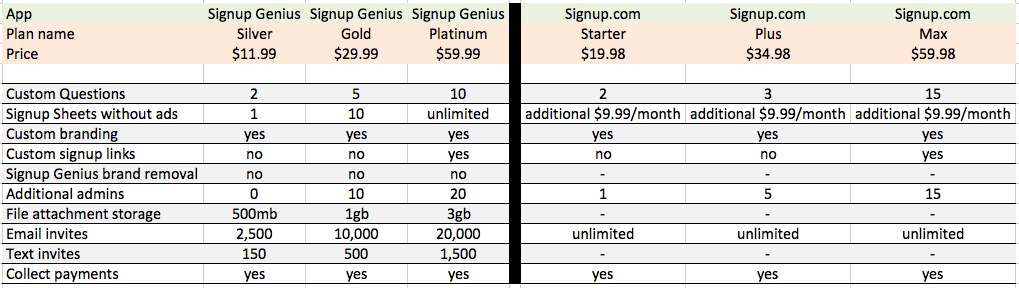
When it comes to pricing, Signup Genius and Signup.com each offer a range of options designed to suit various needs, from free plans for small groups to premium plans with enhanced features for larger organizations. Here’s a breakdown of their pricing structures, key features within each tier, and which types of users are best suited for each.
Signup Genius Pricing
Customer Support
Effective customer support is crucial for any software platform, especially those used for event and volunteer management where smooth operations are key. Both Signup Genius and Signup.com provide support to help users address issues quickly, but the level of support varies by plan.
Signup Genius offers a range of support options depending on the user’s subscription level:
-
Support Channels: Signup Genius provides email support to all users, with response times that are typically faster for those on paid plans. While phone support is not standard, Platinum plan users have access to priority support, ensuring quicker response times and assistance from senior support representatives. The platform also has an extensive help center with FAQs, articles, and video tutorials that cover most common questions.
-
User Feedback: According to reviews on Capterra and Trustpilot, many users appreciate Signup Genius for its ease of use and straightforward functionality. However, some users mention that they would prefer more immediate support options, such as live chat or phone support, which are currently limited. Positive reviews often highlight Signup Genius as a reliable, user-friendly platform for organizing events, with the main drawback being slower response times on the free plan.
Signup.com offers multiple support options, with more comprehensive support available on higher-tier plans:
-
Support Channels: Signup.com provides email support to all users and offers phone support for Premium and Enterprise plan holders, which can be a significant advantage for large organizations or those needing more responsive assistance. Additionally, the platform has a robust knowledge base with step-by-step guides, FAQs, and troubleshooting resources, which many users find helpful. Enterprise users also receive priority support, which includes faster response times and dedicated account management options.
-
User Feedback: Signup.com generally receives positive reviews on platforms like Capterra and G2, with users noting its extensive functionality and flexibility, especially for larger volunteer events and multi-day scheduling needs. Some users mention that phone support on higher-tier plans adds considerable value, especially for complex events. However, a few reviewers report that the learning curve can be steeper compared to Signup Genius, with some of the platform’s advanced features requiring additional support or training to fully utilize.
Summary of Customer Reviews
Both Signup Genius and Signup.com are popular tools for managing events and volunteer signups, but each has its own strengths and limitations. Here’s a breakdown of the main pros and cons of each platform, along with suggestions on which tool may be best suited for different scenarios.
What users love about Signup Genius:
Easy to use and user-friendly interface. SignUpGenius is consistently praised for its simplicity and ease of use. Users appreciate how straightforward it is to set up events, create sign-up sheets, and navigate the platform. Even those who are not tech-savvy find it intuitive and accessible. The simplicity extends to both organizers creating events and participants signing up, making it a versatile tool for various demographics. Many users highlight how quick and hassle-free it is to sign up for events, volunteer opportunities, or time slots.
Effective organization and coordination tool. Users love how SignUpGenius streamlines the process of organizing events, coordinating volunteers, and managing sign-ups. It's particularly appreciated for its ability to keep track of who has signed up for what, allowing organizers to see at a glance what slots are filled and what still needs to be covered. The platform's capability to handle various types of events - from school functions to volunteer opportunities to parent-teacher conferences - makes it a versatile organizational tool that saves time and reduces the stress of event planning.
Helpful reminders and notifications. A frequently mentioned feature is the automated reminder system. Users appreciate receiving timely notifications about their commitments, which helps them remember what they've signed up for and when. This feature is valued by both organizers and participants, as it reduces no-shows and helps ensure that volunteers fulfill their commitments. The ability to customize and manage these notifications adds to the platform's appeal.
Flexibility and customization options. SignUpGenius is praised for its flexibility in accommodating different types of events and sign-up needs. Users like the ability to customize fields, set specific time slots, and tailor the sign-up process to their unique requirements. The platform's adaptability to various scenarios - from meal trains to school events to non-profit volunteering - is seen as a significant advantage. Many users also appreciate the option to use pre-made templates, making the setup process even quicker and easier.
Free version with robust features. Many users express satisfaction with the free version of SignUpGenius, which offers a comprehensive set of features suitable for most basic needs. The ability to create and manage sign-ups without cost is highly valued, especially by non-profit organizations and school groups. While some users note the presence of ads in the free version, many find this a reasonable trade-off for the functionality provided. The availability of a feature-rich free option makes SignUpGenius accessible to a wide range of users and organizations.
What users don't like about Signup Genius:
User Interface and Visual Design. Many users mentioned that the interface looks outdated and could benefit from a visual refresh. Comments like "The look of it feels old fashioned. Not as sleek and modern" and "The overall aesthetic look of the app is not visually pleasing, it looks dated" suggest that a more modern, visually appealing design could enhance user experience. Improving the UI could make the platform more attractive, especially to younger users.
Mobile Experience. Some users reported difficulties when using SignUpGenius on mobile devices. Comments such as "I wish it worked a little better on my phone" and "Sometimes, it is hard to create a timeslot when using the creator on your mobile device" indicate that the mobile version could be optimized for better functionality and ease of use.
Customization Options. While many users appreciate the customization features, some felt they were limited. Feedback like "I wish you could customize more in depth" and "Even with the premium plan, the experience feels pretty dated and cluttered" suggests that offering more advanced customization options, especially for the look and feel of sign-up pages, could be beneficial.
Ad Management in Free Version. Several users mentioned that the ads in the free version can be distracting or intrusive. Comments like "The free plan view is simply an eyesore" and "The ads. At the end when volunteers sign up, they are bombarded with these pop up adds" indicate that improving ad placement or offering more subtle ad integration could enhance the user experience for those using the free version.
Advanced Features and Templates. Some users expressed a desire for more advanced features or a wider variety of templates. Feedback such as "Some features were limited without paying extra" and "I wish there were more design templates" suggests that expanding the range of available features and templates, particularly in the free version, could make the platform more versatile and appealing to a broader user base.
What users like about Signup.com:
User-Friendly Interface and Easy Setup. Users consistently praise SignUp.com for its intuitive and easy-to-use interface. Many reviewers mention how quick and simple it is to set up events and volunteer sign-ups, even for those who are not particularly tech-savvy. The platform requires minimal training or technical knowledge, allowing organizers to create and manage sign-ups efficiently. Users appreciate that they can get started quickly and navigate the system with ease.
Automated Communication and Reminders. A highly valued feature is the automated communication system. SignUp.com sends out automatic reminders to participants about their upcoming commitments, reducing no-shows and improving overall event organization. Organizers love that they don't have to manually send reminder emails or make phone calls. The system also notifies organizers about new sign-ups, cancellations, or changes, keeping them informed without requiring constant monitoring.
Flexibility and Customization Options. Users appreciate the flexibility SignUp.com offers in terms of creating and customizing events. The platform allows organizers to set up various types of sign-ups, from simple volunteer shifts to complex event schedules. Many users mention the ability to easily replicate sign-ups for recurring events, saving time and effort. The option to customize reminder messages, event descriptions, and even branding elements (for paid versions) is also highly regarded.
No Account Required for Participants. A standout feature that many users love is that participants do not need to create an account to sign up for events. This reduces barriers to participation and makes it easier for volunteers or attendees to quickly register. Organizers appreciate that this feature increases engagement and participation rates, as people are more likely to sign up when the process is straightforward and doesn't require additional steps like account creation.
Comprehensive Reporting and Management Tools. SignUp.com's reporting and management features receive high praise from users. Organizers can easily access and export lists of participants, view real-time updates on sign-up statuses, and generate reports for analysis. The ability to quickly see who has signed up, manage changes, and keep track of volunteer hours is particularly valuable for event coordinators and volunteer managers. Users also appreciate the option to print out organized schedules and participant lists for offline use.
What users don't like about Signup.com:
Enhanced Customization Options. While many users appreciate the current customization features, some expressed a desire for more advanced options. This includes the ability to further customize the appearance of sign-up pages, more flexible scheduling options (like setting just a start time without an end time), and more diverse background and theme choices. Improving these aspects could enhance user satisfaction and make the platform more versatile for different types of events.
Improved Mobile Experience. Some users mentioned difficulties using the mobile version of the site. Enhancing the mobile interface and functionality could make it easier for both organizers and participants to manage and interact with sign-ups on smartphones and tablets. This could include developing a more robust mobile app or optimizing the mobile website for a smoother user experience.
More Intuitive Navigation and Interface. While many users find the platform easy to use, some mentioned a learning curve or difficulty finding certain features. Simplifying the navigation, especially for first-time users, could be beneficial. This might involve reorganizing menus, providing more visible help options, or offering an interactive tutorial for new users to quickly familiarize themselves with the platform's capabilities.
Expanded Reporting and Analytics Features. Some users, particularly those managing larger events or volunteer programs, expressed interest in more comprehensive reporting and analytics tools. This could include more detailed participant data, customizable report formats, and advanced analytics to help organizers gain deeper insights into their events and volunteer participation trends.
Reduced Advertisements in Free Version. Several users of the free version mentioned that the advertisements can be distracting. While understanding that ads support the free service, finding a balance that minimizes disruption to the user experience could be beneficial. This might involve exploring alternative ad placement strategies or offering an ad-free experience for a lower price point than the current paid plans.
Conclusion and Recommendation
In summary, both Signup Genius and Signup.com offer solid solutions for managing event and volunteer signups, but each brings unique strengths to the table. Signup Genius stands out for its simplicity, affordability, and easy-to-use interface, making it a practical choice for smaller groups, community events, and schools that prioritize ease of use over advanced customization. Meanwhile, Signup.com provides a more feature-rich experience with robust customization, advanced scheduling options, and API access, making it ideal for nonprofits, larger organizations, and businesses with complex volunteer needs.
Here’s a quick recap of which platform might be best for different types of users:
-
Schools and Community Groups: Signup Genius is well-suited for schools, sports teams, and local groups looking for an easy-to-navigate platform with basic but effective tools.
-
Nonprofits and Large Organizations: Signup.com offers the depth of functionality and support that nonprofits and organizations with complex scheduling or branding requirements will find valuable, especially for recurring events or volunteer programs.
-
Businesses and Enterprises: For businesses with detailed event management needs or custom workflows, Signup.com’s API access, advanced reporting, and premium support make it a great choice for professional use.
Why TallyCal Should Be Considered as an Alternative to Signup Genius and Signup.com
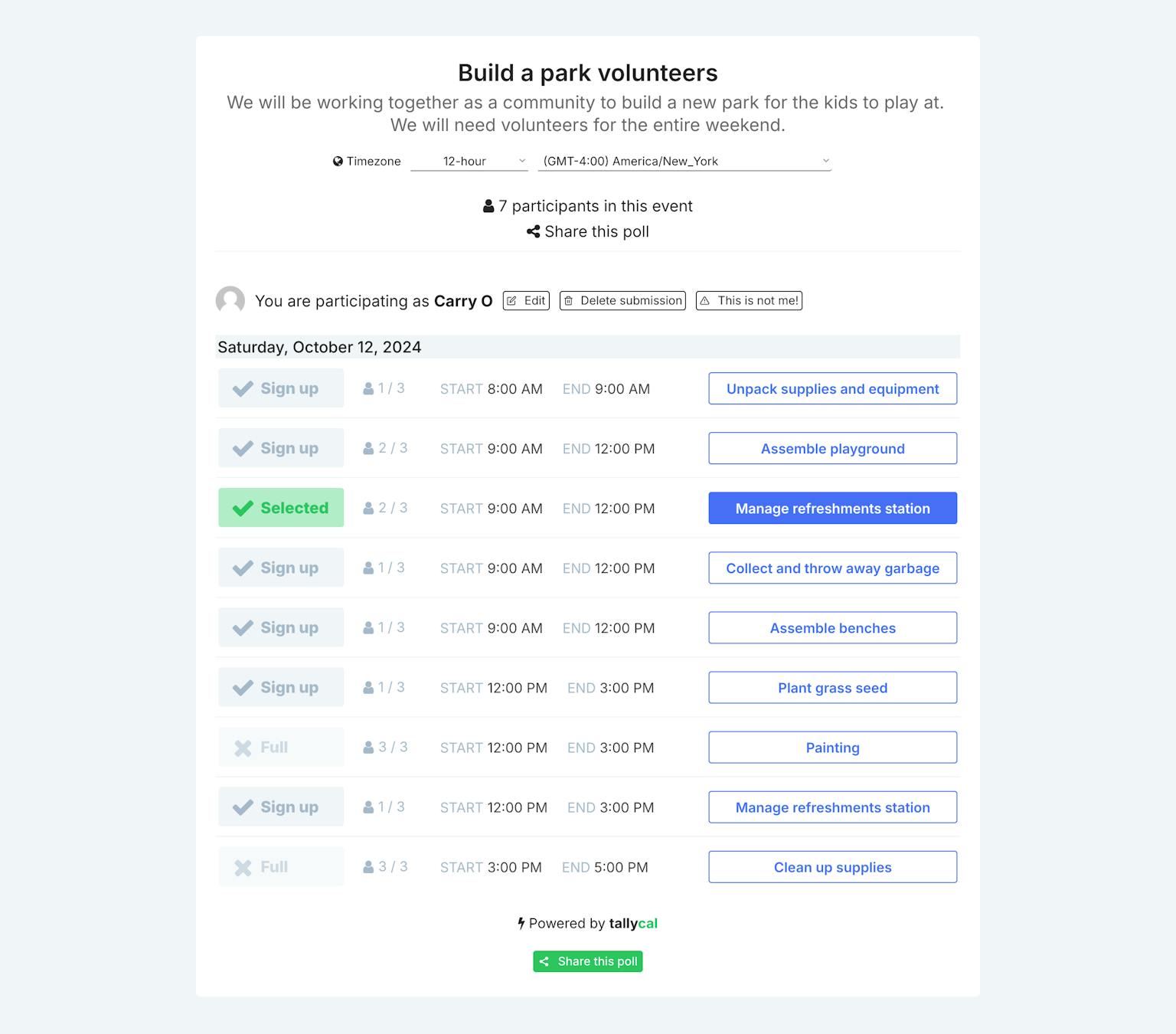
TallyCal is a modern, user-friendly alternative to SignUpGenius and SignUp.com, offering unique advantages for event and volunteer management. Its free plan includes 99% of features, such as unlimited polls and participant submissions, all without ads, user registration, or email submission requirements, ensuring a seamless and distraction-free experience. TallyCal’s intuitive, mobile-friendly interface simplifies event coordination while supporting flexible scheduling options like group polls and recurring events. It also provides seamless calendar integration, customization features, and tools for managing both simple and complex events. With affordable pricing for its paid plans, TallyCal delivers exceptional value for users seeking simplicity, scalability, and advanced functionality.
Efficient volunteer management. Many users turned to TallyCal to solve the challenge of organizing and managing volunteers. They were struggling with traditional methods like spreadsheets or word documents, which were time-consuming and prone to errors. The platform offered a centralized, easy-to-use solution for coordinating volunteers, tracking sign-ups, and ensuring all necessary roles were filled for events.
Streamline event planning and organization. Users were motivated by the need to simplify the complex process of event planning. Whether for school functions, non-profit events, or community gatherings, they sought a tool that could handle various aspects of organization, from scheduling to task allocation. TallyCal provided a comprehensive solution that reduced the administrative burden and made event coordination more manageable.
Better scheduling methods. Prior to using TallyCal, many users struggled with cumbersome scheduling processes, especially for things like parent-teacher conferences or volunteer time slots. They were looking for a way to allow people to self-schedule and view available times without constant back-and-forth communication. The platform's ability to display open slots and allow easy sign-ups addressed this pain point effectively.
Cost-effective solution. Many organizations, especially non-profits, schools, and community groups, were looking for an affordable (or free) tool to manage their events and volunteer needs. They needed a solution that offered robust features without straining their limited budgets. TallyCal's free version, with its comprehensive functionality, met this need and motivated many to adopt the platform as a cost-effective alternative to paid solutions or manual methods.