Polls for Student Study Group Scheduling

Coordinating group projects, lab syncs, and midterm review sessions shouldn't take longer than the studying itself. Say goodbye to endless back-and-forth group texts on Discord or GroupMe, and skip the hassle of ad-cluttered legacy scheduling tools. TallyCal lets you create free, flexible availability polls in seconds—whether you want classmates to paint their free time on an intuitive visual grid or vote Yes/No/If Need Be on specific meeting slots. Best of all, your study group can submit their availability instantly on any device with zero sign-ups, no account creation, and zero ads.
Why Choose TallyCal
Coordinating schedules for group projects and study sessions shouldn't feel harder than the coursework itself. TallyCal is built from the ground up to make finding a common meeting time fast, simple, and completely stress-free.
1. 100% Free & Completely Ad-Free
Unlike traditional polling tools that clutter your screen with pop-ups, auto-playing video ads, and paywalls, TallyCal offers a clean, zero-distraction visual grid. Focus purely on finding a time that works without wading through ads or accidental clicks during midterms and finals week.
2. Zero Sign-Up Required for Classmates
Eliminate response friction. Your classmates don't need to create an account, log in, or verify an email to submit their availability. They simply open your TallyCal link, select their free times in seconds, and submit. Maximum responses with zero hassle.
3. Built for Discord, GroupMe & WhatsApp Sharing
Drop your custom poll link straight into your class group chats. TallyCal is fully optimized for mobile browsers, allowing classmates to tap open availability right from their smartphones between lectures, at the library, or on the go.
4. Visual Grid Polling & Instant Time Zone Sync
TallyCal automatically detects each user’s local time zone, eliminating the guesswork for hybrid or remote study sessions. See overlap instantly on an intuitive visual availability grid so group leaders can pick the optimal meeting slot in a single glance.
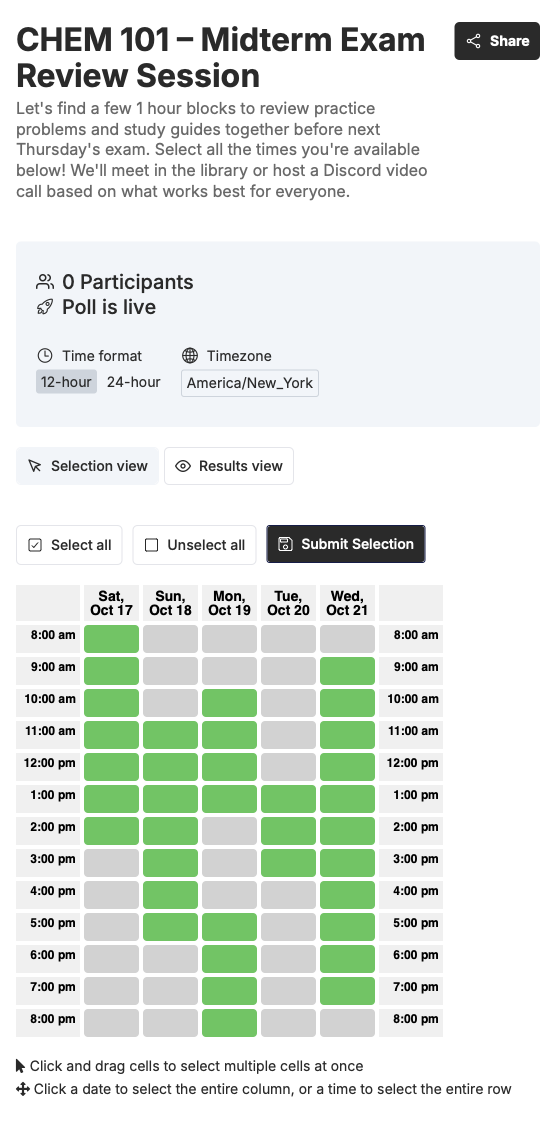
How to Create Polls for Student Study Group Scheduling
How to Schedule a Study Session in 3 Easy Steps
Whether you need to map out exact hourly availability across the entire week or just want classmates to vote on a few specific meeting times, TallyCal makes group scheduling effortless.
Step 1: Choose Your Poll Type & Set Up Details
Give your session a name (e.g., "CHEM 101 Midterm Review"), add an optional location or Zoom link, and select the polling format that works best for your group:
-
Visual Time Grid: Best when you have open-ended availability and want classmates to paint or tap their free time blocks across a weekly calendar view.
-
Slot Poll: Best when you already have specific days/times in mind (e.g., "Tuesday at 4 PM", "Wednesday at 7 PM", or "Thursday at 2 PM") and want classmates to vote Yes / No / If Need Be on those specific choices.
Step 2: Share Your Poll Link in Group Chats
Copy your unique TallyCal link and drop it straight into your Discord server, GroupMe chat, WhatsApp group, or Canvas message board. Classmates can open the link instantly on their phones or laptops—no app download, account creation, or email login required.
Step 3: View Overlap & Pick the Best Time
As classmates submit their availability, TallyCal automatically overlays responses on a single visual heat map or tallies the top-voted time slots. Identify the peak overlap at a glance, select the winning slot, and finalize your study session!
Frequently Asked Questions
1. Do my classmates need to create an account to vote on availability?
No. Neither you nor your classmates need to download an app, create an account, or log in to submit availability. Classmates simply tap open your unique TallyCal link, mark their free times, and submit—keeping response friction as low as possible.
2. Is TallyCal completely free for students?
Yes. TallyCal offers unlimited active polls and unlimited participants for free, with zero ads or pop-ups. You won't run into paywalls, unexpected trial expirations, or forced upgrades during midterms or finals week.
3. What is the difference between a Visual Grid Poll and a Slot Poll?
-
Visual Grid Poll: Displays an intuitive, calendar-style heat map. Classmates tap or paint their open time blocks across multiple days. Perfect when your group's schedule is totally open and you need to see overlapping free time.
-
Slot Poll: Displays a list of specific proposed meeting times (e.g., "Tuesday at 4 PM", "Wednesday at 7 PM"). Classmates vote Yes, No, or If Need Be on each option. Perfect when you already have 3–5 potential times in mind.
4. How do I share a TallyCal poll in GroupMe, Discord, or WhatsApp?
Once you create your poll, click Copy Link and paste it directly into your class group chat, server channel, or Canvas message board. TallyCal links are fully mobile-optimized, so classmates can open and submit their times seamlessly right from their phones.
5. How do I keep track of my poll links?
Whenever you create a poll, both your shareable participant link and your private admin link are instantly emailed to you. This makes it easy to grab your link later, share it with classmates, or make updates to your poll from any device without worrying about losing your place.
6. How does TallyCal handle different time zones for hybrid or remote group projects?
TallyCal automatically detects each participant's local time zone and converts all meeting options accordingly. Whether your project team is scattered across different regions or studying remotely, everyone sees the poll options in their local time, eliminating accidental double-bookings.
7. Can I limit how many timeslots or options I include in a poll?
Free polls allow you to include up to 15 specific timeslots for slot polls. For visual grid polls, you can customize the exact start and end hours of the day (e.g., 8:00 AM to 10:00 PM) to focus only on realistic study windows.
Ready to end scheduling headaches?
Join thousands of organizers who use TallyCal to plan meetings, events, and signups effortlessly. Start creating your first poll in seconds.
TallyCal makes it easier to schedule group meetings with quick and simple polls for finding the best time. Focus on your event, not on the back and forth scheduling emails.
©2026 TallyCal All right reserved.