COMPARE TALLYCAL
The Best When2Meet Alternative
TallyCal is the free, ad-free When2Meet alternative built for fast group scheduling. Create intuitive availability polls in under 2 minutes with no login or account required, for you or your participants. Experience a clean, modern interface that works seamlessly on desktop and mobile.
What Is When2Meet?
When2Meet is a web-based group scheduling tool designed to help groups find overlapping availability using an interactive time-grid poll. Participants drag across dates and times to indicate when they are free, allowing organizers to quickly identify the best time for a meeting, class, or event.
While popular for its straightforward voting grid, When2Meet relies on an outdated interface, lacks mobile optimization, and displays intrusive third-party ads. TallyCal offers the same simple grid-style availability polling—upgraded with a modern, ad-free design that works effortlessly on smartphones and tablets.
How Does When2Meet Work?
When2Meet is a lightweight web tool designed to help groups find overlapping free time without creating user accounts. The platform relies on a visual matrix grid to collect and display group availability through a simple three-step process:
- Create an Event Poll: The organizer enters an event name, selects a date range, and sets the daily time windows (e.g., 9:00 AM to 5:00 PM).
- Share the Event Link: The platform generates a unique web link that the organizer copies and shares via email, messaging apps, or group chat.
- Paint Availability on the Grid: Participants open the link, enter their name, and click and drag across the interactive calendar grid to highlight the times they are free.
The Availability Heatmap:
As participants submit their schedules, When2Meet overlays the data into a color-coded matrix. The grid shifts from light green to dark green as more people select a specific slot, allowing coordinators to identify the best meeting time at a glance.
Where When2Meet Falls Short:
While the concept is simple, users frequently run into issues with heavy banner ads, clunky mobile touch controls, and an outdated desktop interface that can make dragging across time slots tedious on smartphones. Finding a time that works for everyone doesn't require endless email chains or clunky software.
Why People Switch from When2Meet
Terrible Mobile Experience
When2Meet was built for desktop browsers. Trying to precisely "click and drag" to paint availability on a tiny smartphone screen is a massive headache.
Intrusive Third-Party Ads
The interface is cluttered with banner ads and tracking scripts, degrading the user experience and giving polls an unpolished feel.
Outdated, Archaic Interface
The basic, retro styling looks like a site built in the late 2000s, which can feel unprofessional for business or client-facing scheduling.
No Participant Filtering or Group Subsets
When viewing heatmap results, you cannot filter responses by specific key decision-makers (e.g., viewing availability for only executive staff or required attendees), making it difficult to prioritize essential participants.
For years, When2Meet was a go-to choice because it didn’t force users to create an account. But while the web evolved, the product stayed frozen in time. What was once a quick hack now feels like an outdated desktop relic—blindsiding users with intrusive ads, frustrating mobile voters with tiny drag grids, and causing confusion across time zones.
This is why TallyCal was built. It’s the clean, lightweight group scheduling tool When2Meet should be today:
- 100% Ad-Free & Modern: Sleek visual availability grids and slot polls that look pristine on any screen.
- Zero-Friction Access: No accounts or logins required for organizers or participants.Booknetic
- Automatic Time Zones: Intelligent time conversion so cross-country teams never have to guess.Booknetic
No clutter, no complex setup, and no ad distractions—just create a poll, share a link, and find the perfect time in seconds.
Learn more about TallyCal Visual Grid Polls
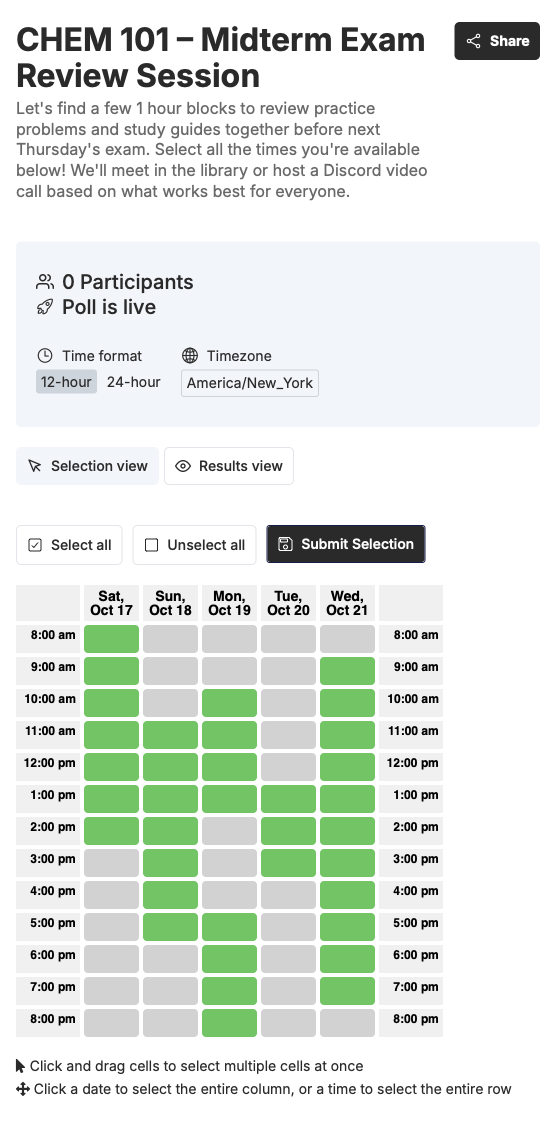
TallyCal vs When2Meet: Feature Comparison
Stop chasing replies across group texts and email chains. TallyCal gives you total control over your polls—allowing hosts to set custom start and end times for specific dates, set participant limits, or keep responses private.
- Launch in 2 Minutes: Set up your poll, copy your link, and start receiving votes immediately.
- Zero Friction for Voters: No app downloads, account creation, or password resets for your group.
- Clutter-Free Heatmaps: Clear, color-coded availability results without banner ads getting in the way.
Who Should Switch from When2Meet to TallyCal?
Remote Teams & Distributed Organizations: If your team operates across multiple states, provinces, or countries, coordinating a meeting on When2Meet is a logistical nightmare. Because it doesn't automatically detect or convert time zones, remote workers are forced to do mental math just to input their availability correctly—inevitably leading to missed meetings and miscommunications. TallyCal handles time zone detection seamlessly, automatically displaying the scheduling grid in each participant's local time while consolidating the data flawlessly for the organizer.
Professionals, Freelancers, & Client-Facing Businesses: First impressions matter, and sending a client or external stakeholder a link to an unpolished, ad-heavy webpage from 2007 doesn't exactly scream "professionalism." TallyCal provides a sleek, modern, and minimalist interface that looks great on any device. It allows you to coordinate with clients, vendors, or cross-company partners quickly without making them jump through hoops or look at intrusive banner ads, keeping your brand identity intact.
Mobile-First Communities & On-the-Go Groups: Let’s face it: most people open scheduling links on their phones while commuting, walking, or multitasking. When2Meet's "click-and-drag" grid is notorious for failing on mobile touchscreens, leading to dropped pins, frustrated guests, and low response rates. TallyCal is built from the ground up to be mobile-first. Responsive, tap-friendly layouts ensure that your friends, board members, or family can log their availability in seconds flat right from their smartphones.
Busy Coordinators Who Value Accuracy: If you find yourself constantly double-booked because you forgot to check your personal calendar while "painting" your availability on a manual grid, you need an upgrade. TallyCal eliminates the tedious back-and-forth toggle. By allowing coordinators and participants to see their real-world calendar commitments right alongside the group poll, it prevents scheduling conflicts before they happen—all while keeping your underlying calendar data completely private.
Frequently Asked Questions
Is TallyCal completely free to use?
Yes, TallyCal is 100% free for both poll creators and participants. There are no hidden paywalls, feature limits, or credit card requirements to launch a group poll.
Do participants need an account or email to vote?
No. TallyCal is designed for zero friction: organizers can create a poll without signing up, and participants can vote instantly by typing their name and entering their availability—no login or registration required.
How is TallyCal different from When2Meet?
While both tools offer visual grid polling without requiring accounts, TallyCal provides a modern, ad-free interface, mobile-friendly touch controls, automatic time zone detection, and calendar integration so participants don't double-book themselves.
Does TallyCal show intrusive ads like When2Meet?
No. TallyCal is strictly ad-free. Your polls will never load banner ads, video pop-ups, or third-party tracking scripts, ensuring a fast, clean, and professional experience for your group.
Does TallyCal work well on mobile phones and tablets?
Yes. Unlike older desktop-first grid tools that require pinching and zooming on small screens, TallyCal is built mobile-first with touch-friendly controls that allow participants to tap or drag their availability smoothly on any device.
How does time zone handling work for remote groups?
TallyCal automatically detects each participant's local time zone and converts the poll grid accordingly. This ensures cross-country and international teams can vote accurately without doing manual math.
Is participant calendar data kept private?
Yes. TallyCal allows users to check their calendar commitments alongside the poll grid, but your personal events and private calendar details are never stored, shared, or visible to the organizer or other voters.
Can I set limits or private response modes on my polls?
Yes. TallyCal offers customization settings that allow hosts to cap participant numbers, customize time slot options, and adjust response visibility to fit the needs of your group or organization.
Ready to end scheduling headaches?
Join thousands of organizers who use TallyCal to plan meetings, events, and signups effortlessly. Start creating your first poll in seconds.
TallyCal makes it easier to schedule group meetings with quick and simple polls for finding the best time. Focus on your event, not on the back and forth scheduling emails.
©2026 TallyCal All right reserved.