
Introduction
Parent-teacher conferences are a vital part of building strong home-school connections. They offer a chance for open dialogue, shared goals, and personalized insight into each student’s progress. But if you've ever been the one in charge of coordinating those meetings, you know the logistical headache they can cause—missed emails, overlapping time slots, endless phone calls, and last-minute changes.
In today's digital world, relying on paper sign-up sheets or back-and-forth communication simply isn't efficient—or necessary. Schools and organizations are turning to online scheduling tools to streamline the process, save time, and improve parent engagement.
Whether you're a principal, administrative assistant, or PTA leader, this guide will walk you through how to successfully organize parent-teacher conferences using online software. We’ll cover why it works, what features to look for, and exactly how to set it up from start to finish.
Let’s take the stress out of scheduling, and make your next round of conferences smoother than ever.
The Benefits of Using Online Scheduling Software
Making the switch to online scheduling for parent-teacher conferences isn’t just about staying current—it’s about making the process easier, faster, and more effective for everyone involved. Here's how your school or organization can benefit:
1. Saves Time for Everyone
Manual scheduling often involves phone calls, emails, and lots of back-and-forth. With online tools, teachers can set their availability once, and parents can book a time that works for them in just a few clicks. It eliminates the middleman and drastically cuts down on administrative work.
2. Reduces Scheduling Errors
No more double-booked time slots or missed messages. Most platforms automatically block out times once they’re taken, send confirmation emails, and even sync with calendars to avoid conflicts.
3. Increases Parent Participation
When the scheduling process is easy, more parents are likely to follow through. Online platforms allow parents to book from their phones or computers at any time of day—no need to call during office hours or fill out a paper form sent home in a backpack.
4. Sends Automatic Reminders
Forgotten appointments are a thing of the past. Most scheduling tools send automatic reminders via email or text, helping parents stay on top of their commitments without any extra work from your staff.
5. Offers Greater Flexibility
Need to add more slots or reschedule a meeting? Online tools make it easy to adjust availability in real-time. Some platforms even allow parents to reschedule their own meetings without needing to contact the school.
6. Tracks and Organizes Data
Want to see which teachers have full schedules? Or track how many families participated? Many tools offer basic reporting features that help schools monitor engagement and identify areas for follow-up.
7. Provides a Professional Experience
Parents notice when a school operates smoothly and professionally. An easy, digital scheduling process can improve your school’s image and show families that you value their time and involvement.
Moving your scheduling online is one small change that makes a big difference, for your team, your teachers, and the families you serve.
Key Features to Look For in Scheduling Software
With so many scheduling tools available, it’s important to choose one that fits the unique needs of your school or organization. While the core function—letting parents book time slots—is standard, the best tools offer additional features that make the experience smoother and more efficient for both staff and families.
Here are the key features to look for:
1. Calendar Integration
Look for software that integrates with popular calendar systems like Google Calendar, Outlook, or Apple Calendar. This ensures that booked time slots automatically appear on teachers’ calendars, reducing the risk of conflicts or double-bookings.
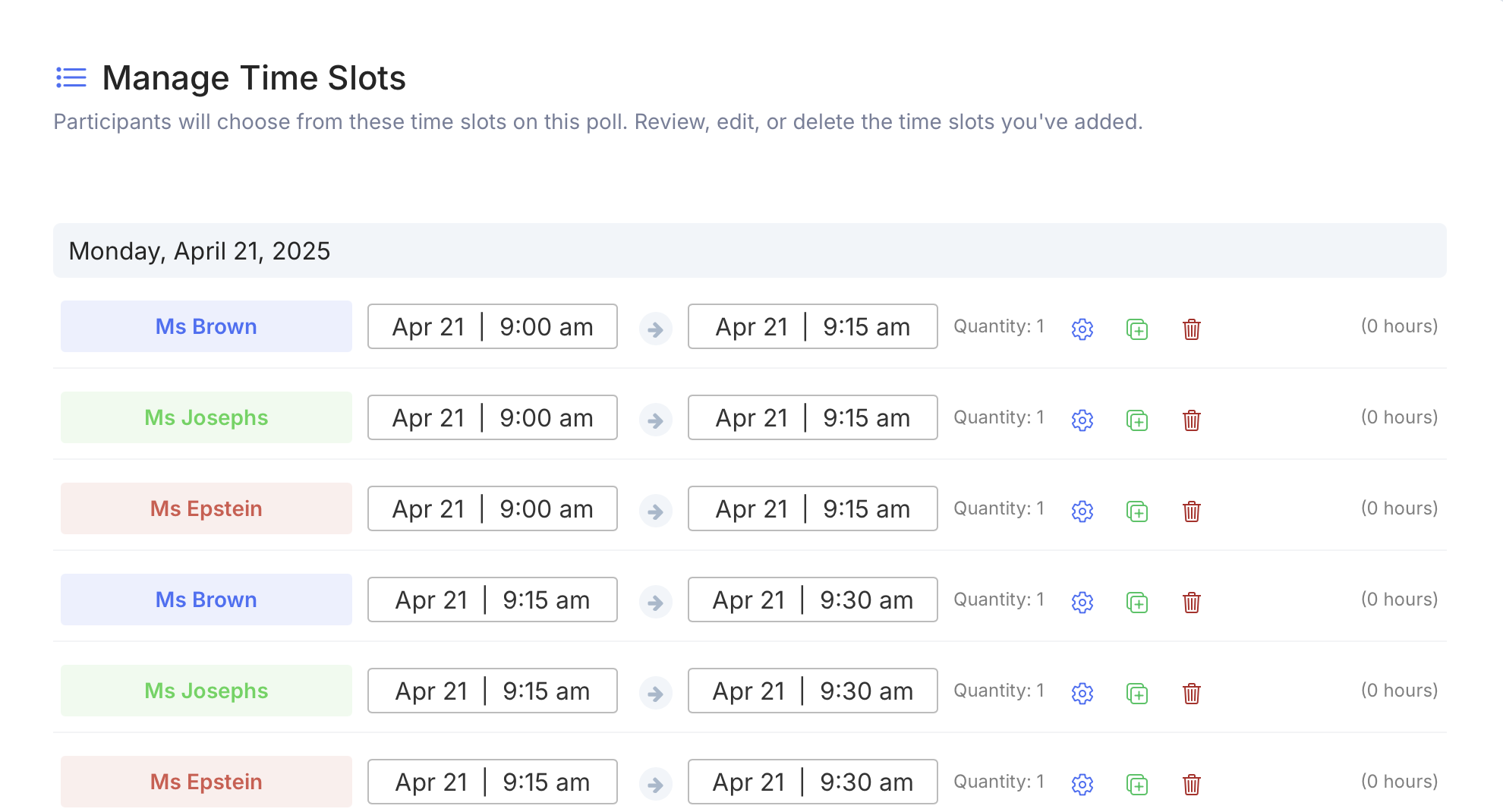
2. Time Slot Customization
Not all teachers keep the same hours. A good platform lets you customize appointment durations and time blocks by teacher, grade level, or department. Some even let you buffer time between meetings.
3. Automated Confirmations and Reminders
Choose a tool that sends confirmation emails and automated reminders to parents. These features reduce no-shows and ensure everyone is on the same page.
4. Easy Parent Access—No Account Required
The best platforms are parent-friendly. Ideally, families should be able to access the schedule via a direct link, without needing to create an account or download an app.
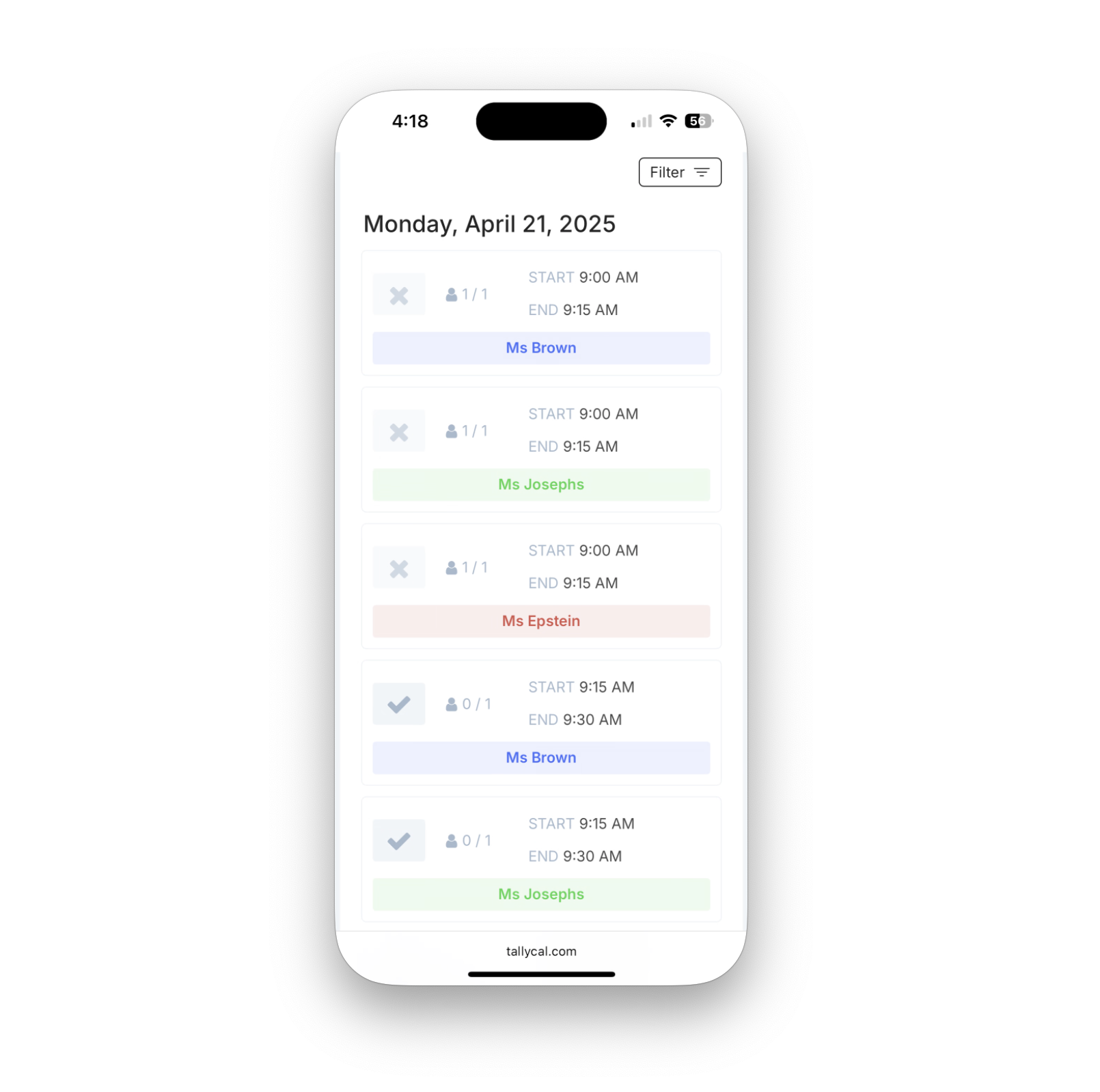
5. Mobile-Friendly Interface
Many parents will book their conference time on their phones. Make sure the tool works well on mobile devices and offers a smooth, user-friendly experience.
6. Multi-Language Support
If your school serves a diverse community, choose software that supports multiple languages. This small detail can make a big difference in accessibility and participation.
7. Administrative Controls and Visibility
Admins should be able to oversee all schedules, make changes on behalf of parents or staff, and generate reports on attendance and usage.
8. Privacy and Security
Look for platforms that are FERPA-compliant or follow similar data protection standards. Scheduling tools often collect personal information, so data privacy should be a top priority.
9. Rescheduling and Cancellation Options
Life happens—parents or teachers may need to change plans. Choose a tool that makes rescheduling or canceling appointments simple and transparent, with automated updates to all parties.
10. Group Scheduling Options
Some platforms allow for group meetings or joint conferences (e.g., with co-teachers or student support staff), which can be especially useful for middle and high schools.
When your scheduling software checks these boxes, you’re not just making it easier to book a meeting, you’re building a smarter, more connected school community.
Step-by-Step Guide: Setting Up Your First Conference Schedule
Now that you've chosen your scheduling tool, it's time to set it up for success. Whether you're using TallyCal or another platform, the process generally follows the same structure. Here’s a clear, step-by-step walkthrough to help you get your first parent-teacher conference schedule up and running.
Step 1: Choose the Right Tool for Your School
Start by selecting the platform that best matches your needs. Consider:
-
The number of teachers/staff involved
-
Whether parents need individual or group appointments
-
Your school’s budget and existing tech ecosystem If you're testing things out, start with a free tool like TallyCal before investing in a more advanced platform.
Step 2: Create an Account and Set Admin Permissions
Once you’ve picked your platform, create an organizer or admin account. Most tools allow you to:
-
Invite additional team members (like teachers or office staff)
-
Assign permissions to edit or manage schedules
-
Set a school-wide calendar or allow teachers to manage their own availability
Step 3: Set Up Time Slots and Availability
Define the days and times your conferences will be held. You'll want to:
-
Choose how long each meeting will be (e.g., 10 or 15 minutes)
-
Build in buffer time between meetings, if needed
-
Customize schedules by teacher, grade, or classroom if possible
-
Some tools let you import availability from a spreadsheet, which is a great time-saver for larger schools.
Step 4: Customize the Booking Experience
Make sure the signup page is clear and parent-friendly. Consider:
-
Adding teacher names or classroom numbers
-
Including student names if applicable
-
Writing a short welcome message with instructions
-
Enabling confirmation emails and automated reminders
Pro tip: Add a “notes” field so parents can mention discussion topics or concerns ahead of time.
Step 5: Share the Schedule with Parents
Once everything is set up, it’s time to let families know. Share the signup link via:
-
School newsletters or email blasts
-
Your school website or parent portal
-
Class-specific communication tools (like Remind, ProCare, or ClassDojo)
Make sure the instructions are simple and accessible for all families. If possible, offer help or alternative options for parents who may not be tech-savvy.
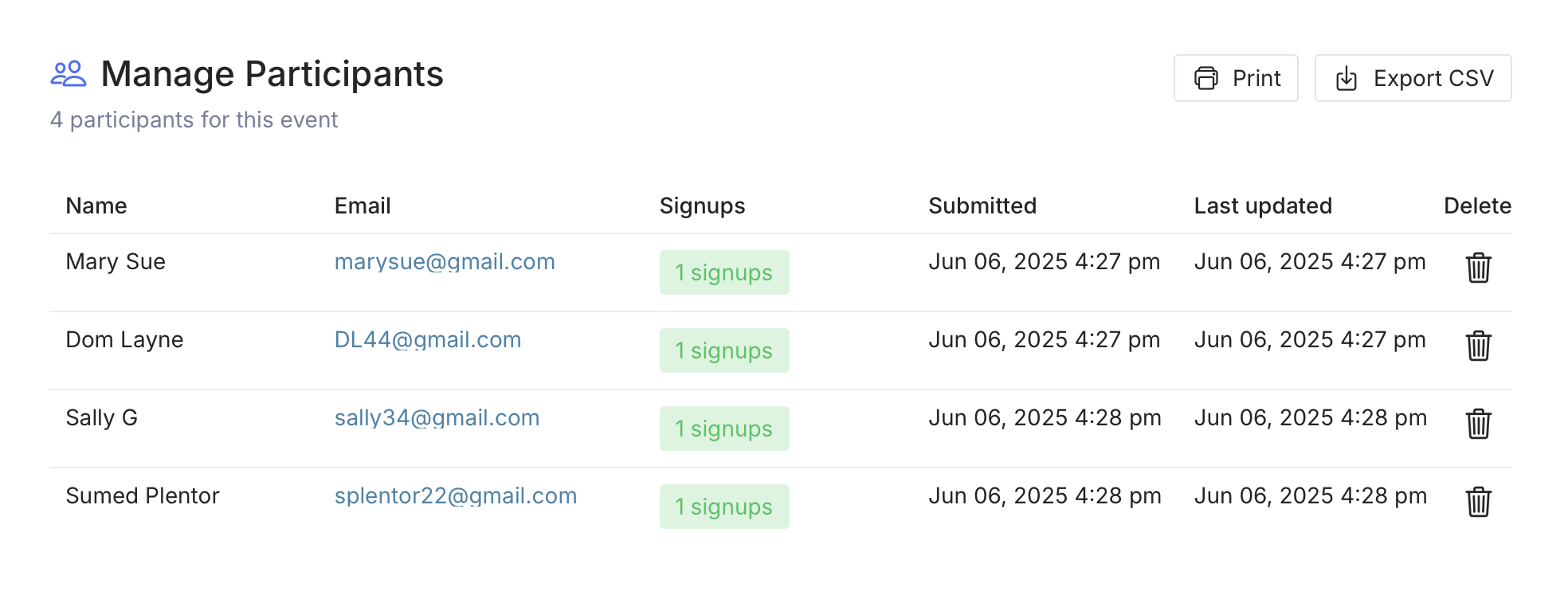
Step 6: Monitor Signups and Make Adjustments
Keep an eye on bookings as they come in. Most platforms allow you to:
-
Add or remove slots
-
Reschedule appointments
-
Send updates or reminders to individual parents Check in with teachers regularly to make sure their schedules are manageable and up to date.
Step 7: Wrap-Up and Gather Feedback
After the conferences, take a few minutes to reflect. What worked well? What could be improved next time? Many platforms offer basic reports that show signup rates, no-shows, and engagement levels.
Send out a short feedback survey to parents and staff, it’s a great way to improve your next round of conferences.
Best Practices for Maximizing Participation
Even the best scheduling system won’t help if parents don’t show up. Fortunately, a few simple strategies can make a big difference in increasing turnout, especially when you're using online scheduling software. Here’s how to make it as easy—and inviting—as possible for families to participate.
1. Communicate Early and Often
Start promoting your conference dates well in advance. Let parents know:
-
Why these meetings matter
-
When and how they can sign up
-
What to expect from the meeting Send reminders leading up to the conference window using multiple channels—email, text, paper flyers, and announcements through your school’s communication apps.
2. Make It Mobile-Friendly
Many parents will be accessing the scheduling tool from their phones. Use a platform that’s mobile-optimized and include a direct link that opens the booking page in one click—no app downloads or account logins required.
3. Offer Flexible Time Slots
Consider offering a mix of daytime and evening options to accommodate different work schedules. If possible, allow for virtual meetings (via Zoom or Google Meet) as an alternative for parents who can’t attend in person.
4. Keep the Process Simple
Avoid requiring parents to create accounts or jump through hoops to book a slot. The simpler the process, the higher the sign-up rate. Provide clear step-by-step instructions, and consider offering sign-up support at school events or via phone for families who need help.
5. Translate Communications
If your school serves families who speak languages other than English, be sure to translate all parent-facing materials—including scheduling links, instructions, and reminders. Some scheduling platforms even support multilingual interfaces.
6. Use Reminders Effectively
Automated reminders (via email and/or SMS) are a must. Send them:
-
Immediately after a booking
-
A few days before the meeting
-
The day of the conference This drastically reduces no-shows and keeps parents informed.
7. Encourage Teacher Follow-Up
Ask teachers to send a quick thank-you or recap message after each meeting. This personal touch strengthens relationships and increases the likelihood that parents will show up next time too.
8. Make Participation Feel Welcoming
Frame conferences as a partnership, not a performance review. Use friendly, inclusive language in all outreach, and reinforce the idea that every parent’s voice matters.
With a thoughtful approach and the right tools, your school can see a meaningful boost in parent engagement—while saving time and reducing stress for everyone involved.
Case Study: A School’s Success Story with Online Scheduling
To see the impact of online scheduling in action, let’s look at how one school made the transition—and what happened next.
The Challenge
Lincoln Elementary, a mid-sized K–5 school with about 450 students, used to rely on paper forms and phone calls to schedule parent-teacher conferences. The process was tedious and time-consuming for both office staff and teachers. It also led to frequent double-bookings, missed appointments, and parent frustration.
The Switch to Online Scheduling
In an effort to streamline the process, the school piloted TallyCal for fall conferences. They chose it for its ease of use, mobile compatibility, and free pricing tier. Here’s how they rolled it out:
Teachers submitted their available time slots to the front office
The admin created individual sign-up pages by grade level
Parents received a direct link via email, school newsletters, and ClassDojo
Staff sent reminder emails and offered assistance to families who needed help accessing the tool
The Results
The change was immediately noticeable:
Participation jumped 22% compared to the previous spring
Zero double-bookings occurred across all 21 classrooms
85% of parents signed up within the first 72 hours
Office staff saved an estimated 12+ hours in manual scheduling and phone calls
Teachers reported feeling more prepared thanks to the optional “Notes” field, where parents could mention concerns ahead of time
Perhaps most importantly, the feedback from parents was overwhelmingly positive. Many appreciated the flexibility to book outside of school hours, and others said it made them feel more included in their child’s education.
What They Learned
Clear, early communication was key to quick adoption
Offering a “help desk” at pickup time helped less tech-savvy parents get on board
Building in 5-minute buffer times between appointments made the conference day feel much less rushed for teachers
Lincoln Elementary now uses online scheduling for every parent-teacher conference, as well as other school events like back-to-school night and volunteer signups.
This success story isn’t unique—schools of all sizes and tech levels can benefit from a more modern, parent-friendly approach to scheduling.
Frequently Asked Questions (FAQ)
1. Do I need to be tech-savvy to use online scheduling?
No, most online scheduling platforms are designed to be user-friendly, even for those with limited tech experience. Platforms like TallyCal have intuitive interfaces, and they also provide step-by-step instructions for both administrators and parents. Plus, many schools offer support for parents who may need assistance.
2. What if a parent misses their scheduled conference time?
Most scheduling tools allow parents to reschedule or cancel their appointments. As an admin, you can also make changes or help parents reschedule if needed. For the best experience, be sure to set up automated reminders to reduce the chance of missed appointments.
3. How do I ensure the privacy and security of parent and student data?
Look for scheduling software that complies with data protection regulations like FERPA (Family Educational Rights and Privacy Act). Many platforms offer secure, encrypted communications and allow you to control who can access sensitive information. Always choose a tool that prioritizes privacy and security.
4. Can I offer virtual meetings for parents who can’t attend in person?
Yes, most scheduling platforms allow you to offer virtual conference options. Tools like Zoom or Google Meet can be integrated with your scheduling platform, allowing parents to book virtual appointments. Be sure to provide clear instructions for accessing the virtual meetings.
5. Can I limit the number of appointments a teacher can schedule in one day?
Yes, many online scheduling platforms let you set limits on the number of appointments per teacher per day. You can customize time slots, build in buffer periods between meetings, and manage teacher availability to avoid overloading anyone.
6. What if a parent doesn’t have internet access or struggles with online tools?
To ensure all families have access, provide alternative ways to book appointments. This could include offering phone-based sign-up options or hosting in-person sessions where parents can sign up for a time slot. Additionally, consider setting up a support desk at school where parents can receive assistance with booking.
7. How can I track attendance for parent-teacher conferences?
Most online scheduling platforms offer reporting tools that allow you to track which parents have signed up, whether they showed up, and any changes made. Some platforms also send post-conference follow-up reminders or surveys, helping you monitor participation and improve future events.
8. How far in advance should I open the conference scheduling?
It's best to open the scheduling window at least 2–3 weeks in advance. This gives parents ample time to book and adjust their schedules. You can also send periodic reminders as the conference date approaches.
9. Can online scheduling be used for other school events, not just conferences?
Yes, many schools use online scheduling for other events like back-to-school nights, parent workshops, or volunteering opportunities. The same scheduling platforms can be used for a variety of events, saving you time and effort in organizing different types of school-related meetings.
10. What happens if a parent needs to change their appointment last minute?
Most platforms allow for easy rescheduling. Parents can typically change their appointment time directly from the scheduling page, and the system will automatically send out updates to both the parent and the teacher. If needed, school staff can assist parents with changes or cancellations.
This FAQ section addresses the most common concerns and questions schools may have when transitioning to an online scheduling system. If you have more specific questions, feel free to reach out to TallyCal for further support.
Conclusion
Parent-teacher conferences are a key component of fostering strong communication between home and school. By embracing online scheduling, schools can make the process easier, more efficient, and more inclusive for everyone involved—teachers, parents, and staff alike.
Key Takeaways:
-
Online scheduling tools save time and reduce errors, making the entire process smoother for everyone.
-
The right features, like calendar syncing, automated reminders, and customizable time slots, are essential for maximizing efficiency.
-
With clear communication and some simple strategies, you can boost parent participation and ensure your conferences are a success.